
Change Your Menu Prices Instantly: Dayparting and Happy Hour
August 24, 2026 · Captain
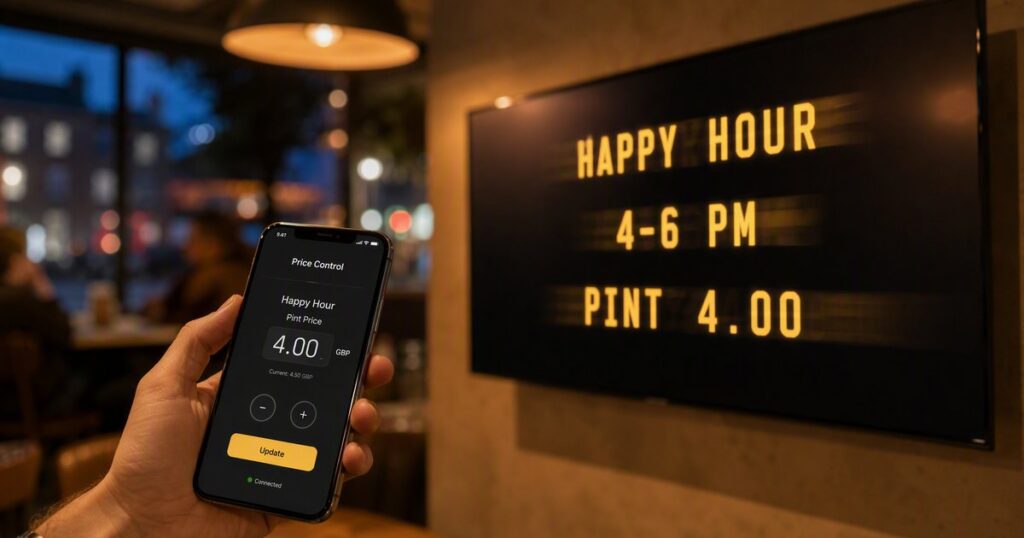
To change your menu prices instantly, you need a menu board that is software rather than paper. With a split-flap board you edit the price on your phone and every character flips into place on the wall in seconds, or you schedule the change so happy-hour and lunch pricing switch on their own. No reprinting, no chalk, no waiting on a designer. Here is how it works in practice.
The problem with every static menu
A printed menu is a decision you are stuck with until the next print run. A chalkboard is a decision you rewrite by hand, badly, during a rush. Both mean your prices lag behind reality: the cost of an ingredient moves, a supplier changes, you want to run a promo, and the menu on the wall says something else for another week.
A digital menu board removes the lag. The price on the wall is whatever you last typed, and typing it takes seconds.
Changing a price on the fly
The simplest version needs no setup at all:
- Open the app on your phone.
- Change the price, or flip an item to “SOLD OUT”.
- Watch the board flip into place on the wall.
That is it. It works from behind the counter or from home. If you run a QR code menu as well, the price on the customer’s phone updates in the same instant, so the board and the QR menu never disagree.
Dayparting: a different board at different times
Dayparting means showing different content at different times of day, automatically. A cafe might run:
- Morning: coffee and pastries.
- Midday: a short lunch menu with prices.
- Evening: a wine and small-plates list.
You set each board and the time it should appear, and the screen switches on its own. Nobody has to remember. This is scheduling and dayparting, and once it is set you can forget it.
Happy hour that switches itself
The classic case. Set a rule: at 4pm the board shows happy-hour prices, at 6pm it goes back. Every day, without anyone touching it.
| Time | What the board shows |
|---|---|
| Open to 4pm | Standard prices |
| 4pm to 6pm | Happy-hour prices |
| 6pm to close | Standard prices, evening menu |
The staff never have to swap a sign, and you never lose margin because someone forgot to change it back.
Why this matters more than it sounds
Menus that update themselves do two quiet things for a small venue. They protect your margin, because your prices track your costs instead of lagging a week behind. And they buy back time, because the ten minutes a day someone spends redoing a board is ten minutes on the floor instead. Multiply that across a year and it is the whole reason the cafes and restaurants using Split-Flap TV stay with it.
What it takes to set up
A TV you already own, a cheap streaming stick, the app, and your phone. You can be scheduling your first daypart within an hour of starting a free trial. The getting started guide has the steps.
FAQ
How do I change a digital menu price instantly? Open the app on your phone, edit the price, and the board flips to the new value in seconds. There is nothing to reprint.
What is dayparting on a menu board? Dayparting is showing different menus at different times of day automatically, for example coffee in the morning and a wine list in the evening. You schedule each board once and the screen switches on its own.
Can the board change to happy-hour prices by itself? Yes. You set a start and end time, and the board switches to happy-hour pricing and back every day with no staff action.
Does the customer’s phone menu update too? If you use a QR code menu alongside the board, yes. Change the price once and both the wall board and the QR menu update together.
How much does this cost? Scheduling and instant price changes are included from €19.99/month per screen. See pricing for the plans, with a free trial and no card.
Never reprint a menu again. Start a free trial, or read more about scheduling and dayparting.