
Scheduling & dayparting
Boards that change themselves by time of day, breakfast at 8, cocktails at 6.
Available on the Economy plan and up
Scheduling means the right board shows at the right time, automatically. Build the boards you want, breakfast, lunch, dinner, happy hour, a closing message, then assign each to a time slot. At each slot the screen switches on its own, so no one has to remember to change it.
It's the feature that makes a board truly hands-off. Menus swap through the day, promotions run only during set hours, and the screen looks after itself, freeing your staff to look after customers.
Dayparting changes the board when the time of day changes. A repeating pattern does something different: it cycles several boards in order, over and over, inside a window you set. A lobby screen can run a welcome board for thirty minutes, today's events for thirty, then start again, nine to five, Monday to Friday. Boards are never cut off part way through, so if the next one cannot finish before the window closes it is not started at all.
- ✓Time-based board switching
- ✓Set-and-forget weekly schedules
- ✓Different content per screen
- ✓Rotate several boards on one screen
Where Scheduling works best
The same feature adapts to lots of spaces, here are the most popular ways people use it.
Dayparting menus
Switch breakfast, lunch and dinner menus automatically at the times you set.
Happy hour
Run discounted pricing only during set hours, then switch back on its own.
Opening & closing
Show an “open” welcome and a “see you tomorrow” message at the right times.
Timed promotions
Display a promo board only during the window you're running the offer.
Weekly routines
Set a repeating weekly schedule once and let it run.
Per-screen content
Schedule different content on different screens from one account.
Lobby rotation
Cycle a welcome board, today's events and opening hours through the working day, on repeat.
Menu and promo together
Alternate the full menu with a promotion board so both get seen, without either taking the screen for good.
Live in a few taps.
-
01
Build your boards
Create each board you want to show, for example breakfast, lunch and dinner.
-
02
Open Scheduling, then New schedule
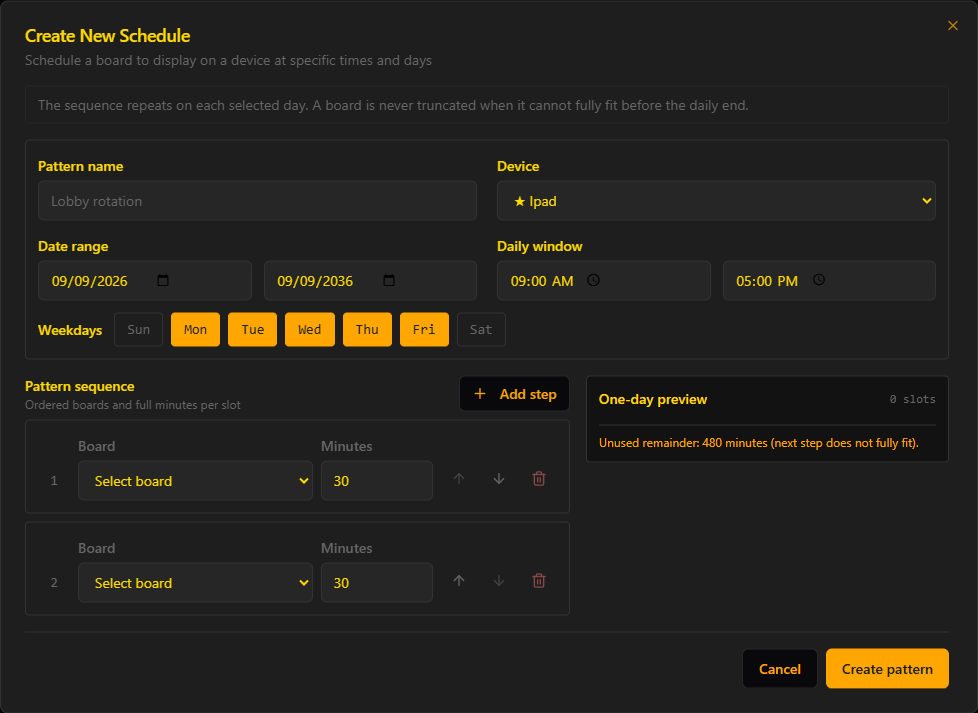
Choose a single schedule for one board in one time window, or a repeating pattern to rotate several boards across a daily window.
-
03
Set the window and the days
Pick the device, the date range, the daily start and end time, and the weekdays it runs on.
-
04
Add each board and how long it holds
List the boards in the order you want them with the minutes each should stay up. The one-day preview shows how many slots you get and whether any minutes are left unused.
-
05
Save and forget it
Saving creates the schedules for you and the screen runs them from then on.
Good to know.
Live price lists
Flip prices the moment they change, perfect for cafés, bars and retail.
View →Countdown boards
Count down to your launch, event or deadline. The number flips down on its own every day, so the board builds anticipation while you forget about it.
View →Heartbeat, remote screenshots and restart after a power cut
Know every screen is on, see what each one is showing, and have them come back by themselves.
View →Get the board. Skip the hardware.
7 days free, no card. Then pick the plan you love.