
How to Automate Office Noticeboards Without Paper
July 17, 2026 · Captain
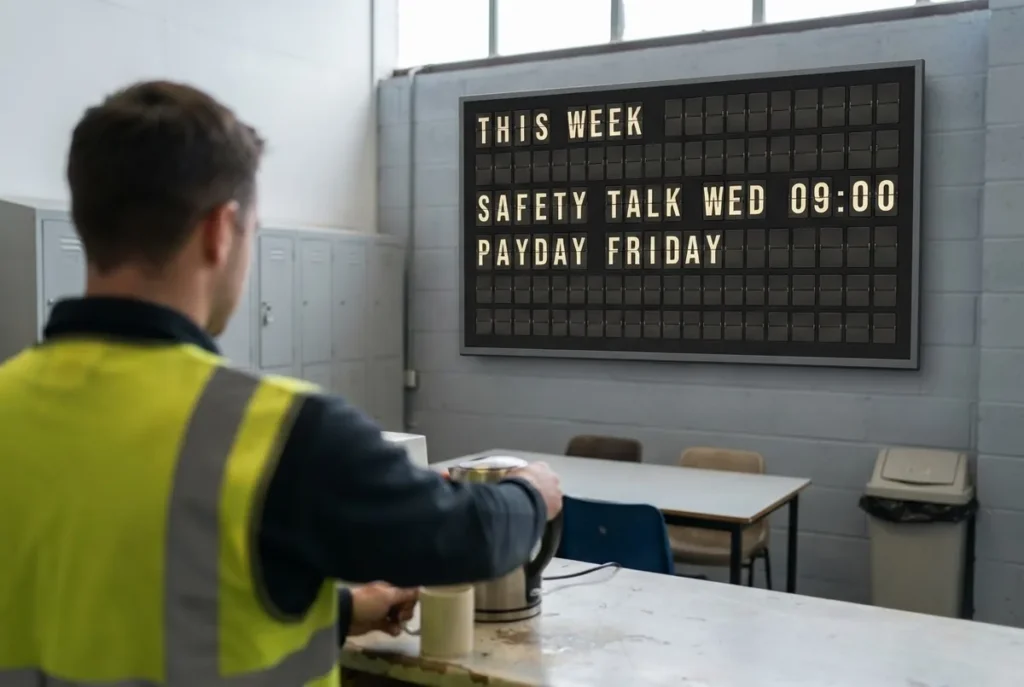
At 9:07 a.m., the printed meeting-room schedule is already wrong. A visitor has arrived early, the lunch menu has changed, and someone has taped a new Wi-Fi password over yesterday’s notice. Learning how to automate office noticeboards is less about adding another screen to the wall and more about ending this daily cycle of paper, tape, and out-of-date information.
For offices that care about atmosphere as much as efficiency, a split-flap-style display offers a more considered answer than a standard bulletin board. The familiar click-clack movement recalls station halls and hotel lobbies, yet the message can be updated from an app in moments. It gives changing information the attention it deserves without turning the workplace into a wall of generic visual noise.
Why paper noticeboards stop working
A physical noticeboard works when information changes once in a while. It becomes a liability when schedules, events, policies, room bookings, visitor details, or team updates shift every day. The issue is not that paper is incapable of communicating. It is that it depends on someone noticing the change, printing the update, walking to the board, and removing the old version.
That process creates small but costly gaps. Employees follow an old instruction. Guests arrive at the wrong room. A safety reminder gets buried beneath a flyer for a past event. Even when the information is correct, a crowded board can make a polished office feel improvised.
An automated noticeboard turns one fixed place into a live communications channel. Instead of asking, “Has anyone updated the board?” your team can ask, “What should people see next?” That is a much better use of attention.
Start with the messages people actually need
Before choosing a display or building layouts, audit what your noticeboard is meant to accomplish. Many offices try to put every internal announcement in one location. The result is a cluttered wall and a message that nobody reads.
Separate your content by audience and urgency. A lobby display may need visitor greetings, room directions, office hours, and a short brand message. A staff-area display may prioritize shift notes, workplace reminders, deadlines, and team celebrations. A meeting-space display should be even more focused: room status, the next booking, and simple wayfinding.
It helps to identify four categories of information: always-on details such as Wi-Fi or office hours; scheduled content such as weekly meetings and lunch service; time-sensitive updates such as a room change; and culture-building messages such as birthdays or recognition. Each category should have a clear place in the rotation. If a message does not help someone make a decision, find a location, or feel welcomed, it may not need to be on the board.
This first step also prevents a common automation mistake: digitizing clutter instead of removing it.
How to automate office noticeboards with a clear system
A good automated noticeboard has three parts: a display that suits the space, a cloud-managed publishing tool, and a content plan that people can maintain during a busy week.
First, choose the location with intent. Place the display where people naturally pause: near reception, outside meeting rooms, by an elevator bank, beside a coffee station, or at the entrance to a staff area. A noticeboard hidden behind desks will not become useful simply because it is digital. Consider viewing distance, ambient light, power access, and whether the message is intended for employees, guests, or both.
Next, use a display format that matches the information. Split-flap-style signage is particularly effective for concise, text-led communication. It is built for the kind of messages people scan in a few seconds: “WELCOME, RIVERSTONE TEAM,” “BOARDROOM – 10:30,” “LUNCH SERVICE 12-2,” or “FIRE DRILL FRIDAY.” The movement gives a changed message a physical sense of arrival, while the restrained presentation keeps the space elegant.
Then create a small library of layouts rather than designing every message from scratch. One layout might hold a large welcome line and a smaller directional line. Another might show time, date, and room information. A third can be reserved for an urgent operational update. With Split Flap TV, teams can configure rows, columns, colors, page timing, and optional click-clack sound to make those layouts feel at home in the office rather than borrowed from a template.
The objective is not endless variety. It is recognition. When people know where to look for the next meeting, the daily announcement, or a visitor greeting, the noticeboard starts to earn its place.
Use scheduling to remove the repetitive work
Automation becomes valuable when it handles predictable changes without someone having to remember them. Start by scheduling content that follows a regular pattern. Morning notices can appear before the office opens. Meeting reminders can run during the busiest arrival window. A quiet, after-hours message can take over in the evening.
Think in dayparts rather than one static playlist. Reception may need a warm welcome and visitor instructions from 8:00 to 10:00 a.m., then show room directions and office updates through the workday. A staff display could show opening tasks in the morning, lunch announcements at midday, and tomorrow’s reminders before closing.
Leave space for live edits. Scheduling is not a substitute for responsiveness. A delayed client, a changed conference room, or a building notice still needs to reach the display immediately. Cloud-based control matters because the person making the update does not need to be standing beside the screen. An office manager can publish a correction from wherever the workday has taken them.
For recurring content, set an expiration date. A message about a Wednesday workshop should disappear after Wednesday. This simple rule keeps the board trustworthy. Once employees see stale information more than once, they stop looking.
Give ownership to the right people
The technology can be simple and still require clear responsibility. Decide who can publish routine messages, who can approve sensitive announcements, and who is responsible for reviewing the schedule each week. In a smaller office, one office manager may own the whole process. In a larger workplace, reception, facilities, HR, and marketing may each contribute content.
Avoid making every employee an editor. Broad access often leads to conflicting messages, inconsistent wording, and a board that feels like a digital version of the old corkboard. Instead, let people submit updates through the process your office already uses, then assign a small group to publish them.
A useful standard is to keep each message readable in three seconds. Write the key fact first, use familiar language, and include one action where needed. “TRAINING MOVED TO STUDIO B” is clearer than a paragraph explaining why the training location changed.
Keep the design disciplined
A split-flap display is not trying to be a video wall. That is its strength. Its text-first format makes announcements feel deliberate, especially in boutique offices, hospitality spaces, creative studios, and workplaces where the environment is part of the brand experience.
Resist the urge to fill every row and page. White space, or in this case empty character space, gives messages room to land. Use a consistent voice and limit the number of pages in a rotation. If an employee must wait through eight messages to find a room assignment, the display has become less useful than a printed sign.
Color can distinguish categories, but it should support legibility rather than compete for attention. The same applies to optional sound. The signature click-clack can be a memorable moment in a lobby or café-style office, but it may not suit a quiet legal practice, clinic, or focused work area. The right choice depends on the acoustics and the culture of the space.
Roll it out without disrupting the office
Begin with one high-value location and a narrow set of messages. Reception is often the best first test because it serves both employees and visitors. Run the display for a couple of weeks, observe what people ask, and adjust the content accordingly. If guests still ask where to go, make directions larger. If staff overlook event reminders, change the time they appear.
The installation itself should not become an AV project. A prepared screen, app-based setup, and a few well-planned layouts can get a noticeboard working quickly. What takes more thought is the editorial routine behind it. That routine is where accuracy, timing, and brand experience come together.
A well-run automated noticeboard does more than replace paper. It creates a small public ritual in the workplace: information arrives, the letters turn, and the room knows what is happening next.