
Scheduling & dayparting
Make a screen change itself by time of day, breakfast at 7am, lunch at noon, cocktails at 6pm, with no one lifting a finger.
Dayparting means showing the right board at the right time automatically. You build the boards you want, then create a schedule that assigns each one to a time slot. At each slot, the screen switches to that board on its own. It's perfect for menus that change through the day, or for running promotions only during certain hours.
There are two kinds. A single schedule shows one board in one time window. A repeating pattern cycles several boards in order, on repeat, across a window you choose, which is what you want for a lobby screen or anywhere the same few boards should take turns all day.
Step by step
-
01
Build your boards
Create each board you want to show, for example separate breakfast, lunch and dinner menus, or a welcome board and a what's on board.
-
02
Open Scheduling and choose New schedule
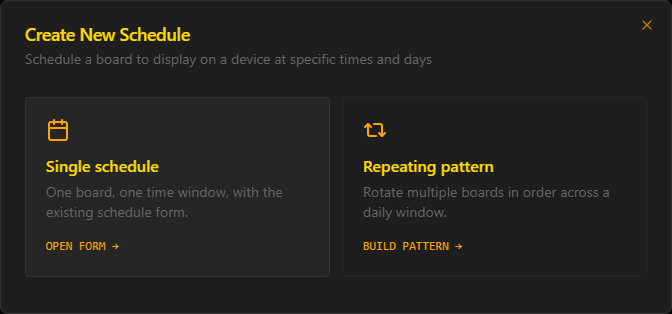
You are asked which kind you want. Single schedule is one board in one time window. Repeating pattern rotates several boards in order across a daily window.
-
03
For one board at one time, choose Single schedule
Pick the board, the time slot and the days it should run, then save. The screen switches to it automatically at each slot.
-
04
For several boards on rotation, choose Build pattern
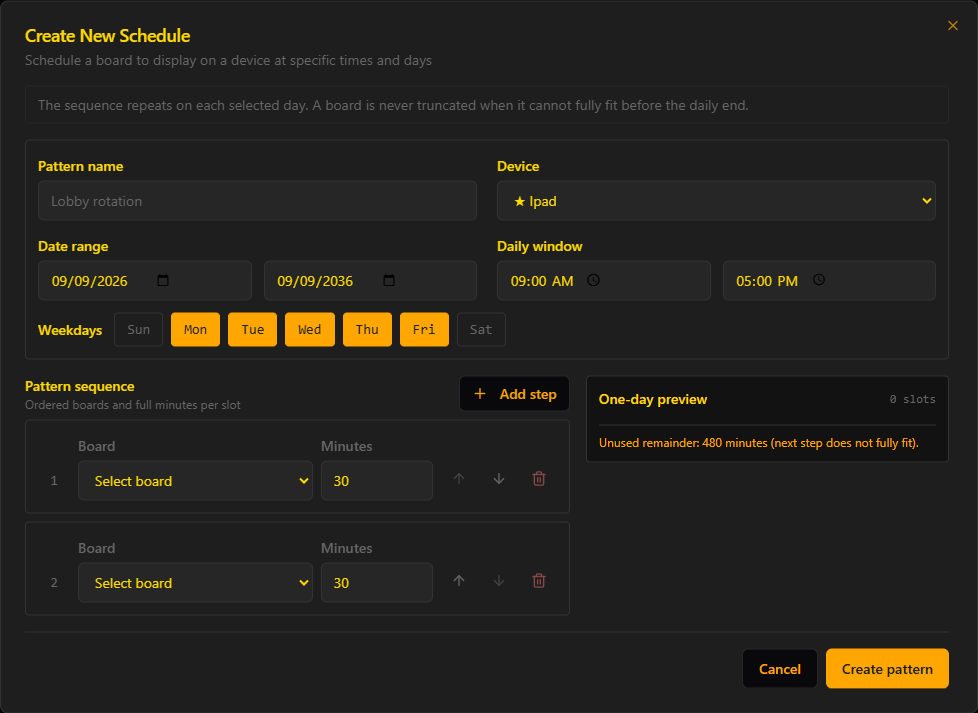
Name the pattern, pick the device, then set the date range, the daily window and the weekdays it runs on. A pattern set to Monday through Friday ignores the weekend.
-
05
Build the sequence
Add a step for each board, in the order you want them shown, and set how many whole minutes each one holds. Use Add step for more than two, the arrows to reorder them, and the bin icon to remove one.
-
06
Check the one-day preview
The preview updates as you type, showing how many slots one day produces and how many minutes are left unused. A 9:00 AM to 5:00 PM window is 480 minutes, so two boards at 30 minutes each fit eight full cycles, sixteen slots, with nothing wasted.
-
07
Create the pattern
Saving builds all of the individual schedules for you, so you will see several entries in your schedule list rather than one. Each is an ordinary schedule you can open and edit later.
- ·A board is never truncated. If the next step in a pattern cannot run in full before the daily window ends, it is not started at all, and those minutes stay empty rather than showing half a board.
- ·Pattern durations are whole minutes, and the sequence restarts from step one at the beginning of every selected day.
- ·Combine scheduling with a looping set of boards, cycle through a few boards within a daypart for variety.
- ·You can schedule different content on different screens from the same account.
Troubleshooting
The board didn't switch at the scheduled time
Check the device's time zone and that it has internet, and confirm the slot is assigned to the correct day. The device needs to be online for scheduled changes.
My repeating pattern leaves a gap at the end of the day
That is deliberate. A board only runs if it fits completely inside the daily window, so the remainder is left empty rather than cutting a board short. Shorten one of the steps until the one-day preview shows no unused remainder.
Keep reading
Creating your first board
ContentUsing variables (time, date & live data)
SetupRunning multiple screens & video walls
Ready to go live?
Start your free 7-day trial, no card. Live in about 5 minutes.