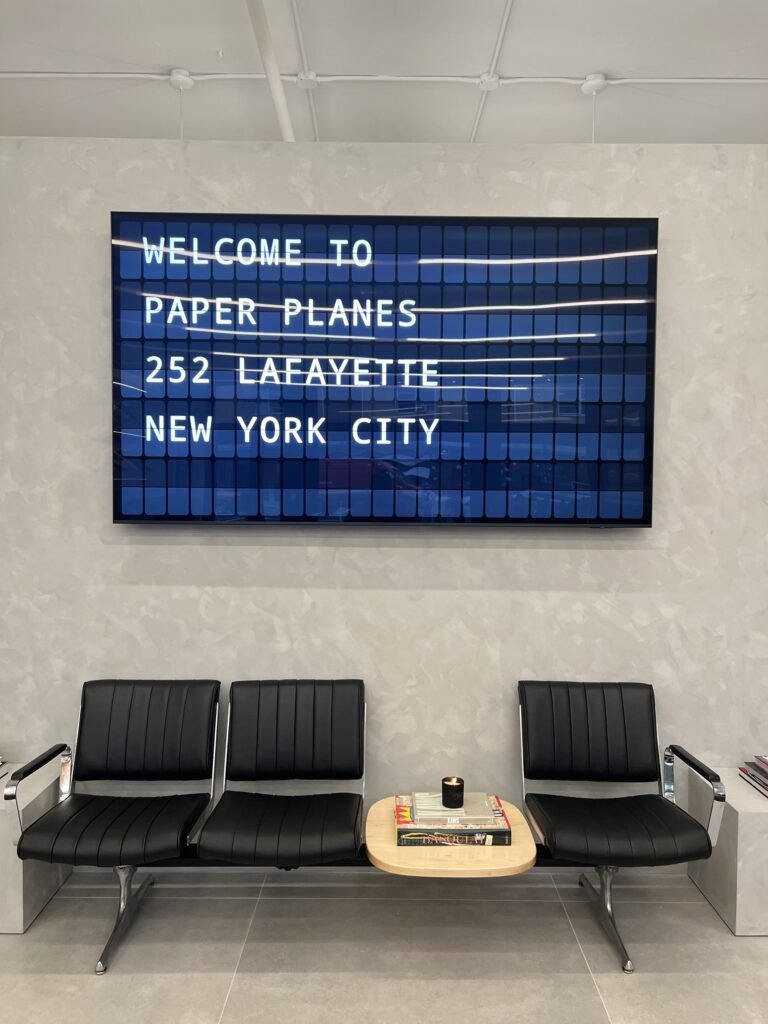
Digital Signage with a Retro Soul: Split-Flap TV Explained

If you’ve ever walked through a European train station in the 1980s or caught a flight from an older terminal, you might remember the distinctive clacking sound of split-flap departure boards cycling through destinations. Those mechanical displays had personality. Today, digital signage dominates public spaces—but most of it looks like just another TV. Digital signage, a modern solution for dynamic content display, has transformed how businesses communicate with customers.

This guide is designed for business owners, marketers, and hospitality managers interested in leveraging digital signage—especially those seeking a unique, retro-inspired approach. You’ll learn about the evolution of digital signage, how Split-Flap TV works, and practical steps to deploy it in your space. In a crowded digital environment, standing out is more important than ever, and this guide will show you how to use digital signage to create memorable, engaging experiences for your customers and employees.

Summary: What Is Digital Signage and Why Does It Matter?

Digital signage can transform any screen into a dynamic platform to engage customers and employees. It allows businesses to display rotating messages, schedules, and real-time data, making communication more effective and visually appealing. Dynamic digital signage solutions can engage audiences and drive results across various industries, from hospitality and retail to offices and transportation hubs. By providing visually engaging content, digital signage can enhance customer experiences, increase recall rates, and influence purchasing decisions. Whether you want to inform, entertain, or promote, digital signage offers a flexible and impactful way to connect with your audience.

Background: The Benefits and Applications of Digital Signage

Digital signage can enhance customer experiences by providing visually engaging content. It is used across industries to display menus, promotions, schedules, and real-time updates, making it a versatile tool for communication. Dynamic digital signage solutions can engage audiences and drive results across various industries, helping businesses stand out and deliver timely information. In waiting areas, digital signage can lower perceived waiting times by 21% or more, improving overall satisfaction. Content management for digital signage is made easy through user-friendly CMS platforms that feature drag-and-drop interfaces and customizable templates, allowing businesses to update content quickly and efficiently.

What Is Digital Signage Today?

Digital signage refers to any electronic display system used to deliver visual content in public, commercial, or communal spaces. Walk down Broadway in Nashville, step into a hotel lobby in New York, or pass through airports worldwide—screens are everywhere. Unlike static posters, these displays rotate messages, pull live data, and adapt their content based on time of day.

Digital signage allows businesses to display rotating messages, schedules, and real-time data. It can display dynamic content in real-time, allowing for immediate updates and engagement. Digital signage can capture an 83% recall rate from viewers, making it a powerful tool for communication.

Typical Formats

  • Menu boards in restaurants cycling daily specials with real-time pricing
  • Departure and arrival boards in train stations pulling live schedule data
  • Promotional screens at gas station pumps displaying fuel prices and targeted offers
  • Internal dashboards in offices showing KPIs, safety reminders, and employee announcements

Digital signage solutions can be customized for any industry, with features and designs tailored to meet the unique needs of restaurants, transportation hubs, retail, offices, and more. Businesses can customize layouts, content types, and display features—such as the number of rotating messages or integration with real-time data—to best fit their specific requirements. Dynamic digital signage solutions can engage audiences and drive results across various industries.

Key Differences from Static Signage

  • Rotating messages keep content fresh without reprinting
  • Live data feeds update automatically (weather, social counters, schedules)
  • Dayparting lets businesses show different content at breakfast versus dinner

Digital Signage Effectiveness

  • Digital displays capture 400% more views than print.
  • Digital signage can capture an 83% recall rate from viewers.
  • Digital signage can increase sales by up to 33% for highlighted products.
  • Over 70% of shoppers have made an unplanned purchase due to digital signage.
  • 77% of shoppers report that digital signage influences their purchasing decisions.

With these foundational concepts in mind, let’s look at how digital signage works in practice and how businesses can implement it effectively.

How Digital Signage Works in Practice

The standard setup involves three components: a screen, a player (or smart TV app), and cloud management software that ties everything together. Digital signage devices are typically connected to the local network via Wi-Fi or Ethernet for seamless operation.

Screen + Player Combinations

  • A café in Austin might use a 55-inch Samsung Tizen smart TV with a native app installed
  • A hotel in Berlin could connect an Android media player via HDMI to a commercial display
  • An office in London might run a browser-based player on a networked computer

Core Workflow from Dashboard to Display

  • Create content on a web dashboard (upload images, type text, embed video)
  • Build playlists and set rotation timing (e.g., cycle every 10-30 seconds)
  • Schedule content for specific hours or days
  • Assign playlists to one screen or many screens across locations
  • Monitor device status remotely to confirm uptime

Digital signage solutions can be deployed across multiple screens and devices without the need for reformatting content. Businesses can also easily update content remotely anytime, anywhere using digital signage software.

Common Content Types

  • Image slides for branding and promotions
  • Short videos (under 15 seconds to maintain attention)
  • Text-based announcements and tickers for urgent updates
  • Live data tiles showing weather, social media counts, or news feeds
The image depicts the interior of a modern café, featuring a mounted display screen that showcases menu items, enhancing the guest experience with dynamic content. This digital signage solution captures attention and allows the business to effectively communicate with customers in an inviting setting.

With a clear understanding of how digital signage operates, let’s examine why businesses are increasingly investing in these solutions.

Why Businesses Invest in Digital Signage

Businesses have rapidly adopted digital signage to replace classic posters and manual letterboards. The shift is driven by the need for speed, cost savings, and consistent branding—printed materials required expensive reprinting for every change, and multi-location chains struggled with mismatched branding.

Customer-Facing Benefits

  • Screens capture 400% more attention than static paper posters through motion and color
  • Upselling becomes effortless—a Dallas bar can promote a Tuesday taco deal with countdown timers
  • Real-time updates handle events, flash sales, or queue management transparently
  • Guest experience improves when check-in times, event schedules, and local info display instantly

Internal Communication Advantages

  • Offices display KPIs on always-on dashboards, reducing meeting times by 20-30%
  • Shift rosters minimize scheduling errors when displayed in break rooms
  • Recognition boards boost morale with employee shoutouts
  • Safety reminders stay visible without paper clutter

Concrete Examples

  • A hotel in Chicago highlights check-in instructions alongside personalized welcome messages on lobby screens
  • A co-working space in Amsterdam features meeting room allocations with color-coded availability grids
  • A restaurant group pushes consistent daily specials across five locations simultaneously

Branding Consistency

  • Enforces uniform fonts, colors, and messaging across all screens
  • Eliminates the mismatches that come from decentralized printing
  • Delivers instant remote updates from a single dashboard

With these benefits in mind, let’s explore the unique qualities of split-flap displays and how they compare to modern digital signage.

Digital Signage vs. Classic Split-Flap Boards

Between the 1960s and 1990s, split-flap departure boards became iconic fixtures in European train stations and airports. Frankfurt Airport, Gare du Nord in Paris, and countless terminals worldwide featured these electromechanical displays where synchronized motors flipped printed flaps to reveal characters. The distinctive clacking rhythm evoked reliability and craftsmanship—a form that many travelers still remember fondly.

Signature Traits of Physical Split-Flap Boards

  • Mechanical flipping motion driven by small motors and belts
  • Distinctive clacking sound as flaps cycled through characters
  • Limited to fixed grids (typically 2-4 rows with 20-40 characters per line)
  • Physical size constraints—some installations reached 10×20 feet
  • Required meticulous maintenance of motors, belts, and custom flaps

Contrast with Modern Digital Screens

  • Silent operation with no mechanical components
  • Unlimited colors, full-motion video, and pixel densities up to 4K
  • Flexible layouts that can change instantly
  • But often visually generic—they look like just another TV

Emotional Difference

  • Mechanical boards feel tactile and nostalgic, with physical motion and sound
  • Typical digital signage blends into the TV-saturated environment
  • Many businesses want the charm without the complexity

Bridging Old Soul and New Technology

  • Split-Flap TV merges these worlds—digital screens that visually mimic classic 1960s split-flap design
  • No mechanical maintenance, no custom parts, no high hardware cost
  • The flip animation happens on-screen, preserving retro aesthetic with cloud-managed flexibility

Now that we’ve established the context and appeal of classic split-flap boards, let’s dive deeper into what makes split-flap displays so special and how Split-Flap TV brings this magic to digital signage.

What is Split-Flap

Split‑flap displays possess something almost magical — a quality that transforms simple messaging into moments of genuine wonder. Born from the bustling energy of airports, city centers, and restaurants, these mechanical marvels use rotating flaps to reveal content in a way that feels alive, tactile, and delightfully unpredictable. Each flip creates a pause — that brief moment of anticipation where viewers find themselves leaning in, almost childlike in their curiosity. For businesses seeking authentic connection, split‑flap displays offer something rare: the ability to make everyday communication feel special, whether announcing arrivals in a terminal filled with weary travelers or showcasing daily specials in a neighborhood café where regulars gather.

What makes split‑flap truly remarkable is how it transforms the mundane into the memorable. The rhythmic motion — that gentle mechanical dance — naturally draws people in, making them pause, smile, and actually read what you’re sharing. With free digital signage software empowering seamless content management, businesses can craft these tactile experiences from anywhere, ensuring messages feel fresh and personally crafted. This approach allows brands to deliver timely updates, showcase offerings, and create those precious “wow moments” that guests remember long after they’ve left. Whether gracing a cozy city café or commanding attention in a major airport, split‑flap displays prove that sometimes the most powerful way forward is to embrace the charm of mechanical magic — turning routine information into something that feels wonderfully, authentically human.

With an understanding of split-flap displays’ unique appeal, let’s see how Split-Flap TV brings this retro magic to modern digital signage.

Split-Flap TV: Digital Signage with Nostalgic Design

Split-Flap TV is a subscription-based SaaS platform that transforms ordinary TVs and tablets into virtual split-flap displays. Split-Flap TV targets small to medium businesses seeking affordable and visually engaging signage solutions. Instead of generic slide decks or video loops, customers get pixel-accurate imitations of vintage airport and train station boards—complete with animated flips that cycle through characters on-screen. The digital signage solution from Split-Flap TV is designed to be easy to implement and manage without technical expertise.

What Makes It Unique

  • Pixel-perfect recreation of 1960s mechanical board aesthetics
  • Animated flip transitions that mimic physical flaps
  • Minimalist, text-first layouts focused on readability over flashy graphics
  • Customizable rows and character counts to match classic board proportions

Main Use Cases with Concrete Examples

  • A craft cocktail bar in Brooklyn displays rotating drink lists with pricing flips every 15 seconds
  • A boutique hotel in Lisbon renders check-in times alongside weather tiles in departure-board style
  • A coworking lobby in Toronto broadcasts Wi-Fi credentials and daily event calendars
  • Restaurants show kitchen open/close times and “Now Seating” messages

Hardware Flexibility

  • Works with existing smart TVs (LG webOS, Samsung Tizen, Android TV, Apple TV) via native apps
  • Supports external media players connected via HDMI for older displays
  • Tablets on counters or stands work for smaller installations

Trial and Subscription Tiers

  • 7-day free trial lets businesses test on actual screens before committing
  • Economy tier: single-screen basics for small bars or cafés
  • Business tier: multi-screen support with advanced scheduling for restaurant groups
  • Cockpit tier: enterprise-scale control with priority support and extended integrations

Open your free account to get started with Split-Flap TV and experience digital signage with retro charm and modern simplicity.

With the basics of Split-Flap TV covered, let’s explore its core features and how they support business communication.

Core Features of Split-Flap TV Digital Signage

The platform emphasizes function over flash—clear text, ambient motion, and real-time data wrapped in a retro-style interface, echoing the benefits described in this guide to digital split-flap displays. Every feature maintains the nostalgic aesthetic while delivering modern capabilities.

Rotating Messages

  • Timed playlists cycle announcements, offers, quotes, or internal messages
  • Rotation intervals range from a few seconds to several minutes
  • Smooth flip animation plays between message changes

Scheduling

  • Day-of-week and time-of-day schedules with an intuitive interface
  • Example: weekday lunch specials from 11:00–15:00, weekend brunch announcements until 14:00
  • Calendar-style configuration for seasonal overlays (holiday messages, special events)

Data-Driven Tiles

  • Live date/time with world clocks for global teams
  • Countdown timers for events, product launches, or happy hours
  • Weather pulls displaying temperature and conditions (sunny, cloudy, rain)
  • Social counters showing live Instagram followers or Google Reviews counts

Business Communication Layouts

  • Meeting schedule boards for offices
  • Production line status for warehouses
  • Daily stand-up notes and team milestones
  • Visitor welcome boards in reception areas

Design Consistency

  • Limited color palettes (monochrome or duotone options)
  • Classic typefaces that evoke authenticity
  • Distinctive flip animation differentiates screens from regular PowerPoint slides
  • Constrained grids of 4-12 rows maintain the retro discipline

Next, let’s look at the software options available for managing your split-flap digital signage.

Software Options

Discovering the perfect software feels like finding that missing piece to your split-flap story—something that brings both power and pure joy to managing your displays, especially when you explore Split-Flap TV reviving the classic display board. For businesses captivated by that nostalgic split-flap magic, there are beautifully crafted software solutions that dance seamlessly across every platform imaginable—Windows, Android, Linux, and beyond. This wonderful compatibility means your split-flap displays become part of your existing world effortlessly, whether you’re creating intimate moments in a cozy boutique or orchestrating a symphony of dozens of displays across multiple cherished locations.

Today’s digital signage software feels almost alive—offering interfaces so intuitive that anyone on your team can craft, schedule, and breathe life into dynamic content. Features like effortless drag-and-drop editing, real-time previews that spark excitement, and automated scheduling ensure your split-flap messages arrive with perfect timing and authentic charm. Advanced playback controls and remote monitoring give you that satisfying confidence to nurture your displays from anywhere, while thoughtful support for split-flap layouts preserves every ounce of that signature retro soul. With software that truly understands the magic, businesses create engaging displays that don’t just capture attention—they create those precious “wow moments,” enhance every guest’s experience, and keep every screen dancing in perfect harmony across however many locations your story reaches.

With software in place, let’s move on to the hardware and setup process for bringing your split-flap display to life.

Hardware & Setup: From TV to Live Split-Flap Screen in Minutes

Most users complete setup in under 10 minutes—no technical expertise required, following the same principles outlined in the getting started with Split-Flap TV platform. The system leverages devices you likely already own or can purchase affordably.

Hardware Choices

  • Existing smart TVs from Samsung, LG, or Sony (43-65 inches, priced $300-800)
  • Tablets on counters for smaller displays
  • Low-cost media players like Android boxes, Apple TV, or Amazon Fire TV Stick ($50-150) connected via HDMI

Step-by-Step Onboarding

  1. Sign up on the Split-Flap TV website and start the 7-day free trial
  2. Install the app from your device’s app store (LG Content Store, Samsung Apps, etc.)
  3. Log in or enter the pairing code shown on-screen
  4. Assign the screen from the web dashboard
  5. Create your first board and push it live

Infrastructure Requirements

  • Standard power outlet and HDMI connection (if using external player)
  • Wi-Fi sufficient for most venues (5-10 Mbps for smooth 1080p playback)
  • Ethernet available as an option for offices and hotels with wired networks

Hardware Recommendations

  • Split-Flap TV provides guidance for bars, restaurants, and office lobbies
  • Users can reuse 80% of existing displays to minimize capital expense
  • Matte anti-glare screens recommended for bright venues
A modern bar features a smart TV mounted on a stylish brick wall, illuminated by ambient lighting that enhances the inviting atmosphere. The TV serves as a dynamic content display, capturing the attention of customers and enhancing their overall guest experience.

Once your hardware is set up, it’s time to understand the mechanics behind split-flap displays and how they are reimagined for digital environments.

Mechanical and Electronics: The Split-Flap Mechanism Reimagined

Mechanical Wonder

At the heart of every split-flap display board lies something magical—a beautiful dance of mechanical wonder and intelligent precision. Each display comes alive through rows of flaps, with every single flap lovingly crafted to spin and reveal new stories in the most mesmerizing way imaginable. Sensors watch over each flap like gentle guardians, ensuring those perfect, satisfying transitions that make people stop and smile. Behind this enchanting performance, a media player and control system work together in perfect harmony—responding to your needs with the kind of reliability that feels almost human.

Customization Options

This reimagined split-flap experience is built for the long haul, designed to keep that magical moment going day after day, night after night—making it absolutely perfect for businesses that want to create lasting impressions around the clock. The system’s beautifully customizable elements let you craft something truly yours, from the number of rows to the style of those delightful animations, ensuring your split-flap display feels like it was always meant to be part of your story.

Business Applications

Whether you’re sharing heartwarming updates in a cozy city terminal, creating that warm “welcome home” feeling in your restaurant, or delivering those exciting travel moments in a bustling airport—split-flap displays offer something special that digital screens simply can’t match. With thoughtful control, effortless management, and the power to create displays that people actually remember and talk about, the split-flap system stands out as more than just signage—it’s a way to make genuine human connections in our increasingly digital world.

With the mechanics and customization options in mind, let’s discuss how to choose the right display for your space.

Choosing the Right Display for Your Space

Selecting the ideal display becomes an exercise in crafting atmosphere—a decision that shapes how spaces breathe and guests experience your brand, especially when considering affordable split-flap boards that deliver retro charm without excessive cost. For businesses seeking to create memorable moments in dynamic environments—airports where anticipation fills the air, restaurants where ambience matters, retail spaces where first impressions define everything—the 86″ UHD Ultra Stretch Digital Signage display from LG Business Solutions emerges as something more refined than mere technology. Its extended aspect ratio and ultra-high-definition resolution don’t just showcase content—they curate experiences, transforming eye-catching visuals and rotating messages into storytelling that enhances the very essence of guest engagement. The display’s sleek, minimal profile integrates with intentional grace into contemporary interiors, enabling businesses to establish sophisticated atmospheres where customers naturally connect with important updates and curated promotions. Whether positioned above a restaurant bar—where it becomes part of the dining narrative—in an airport terminal where it guides travelers through their journey, or at a retail entrance where it sets the experiential tone, this display transcends traditional signage to become a purposeful element in how businesses create lasting, meaningful connections with their audience.

Now that you know how to select the right display, let’s look at how to build and manage a digital signage network.

Creating a Digital Signage Network

Building a digital signage network has evolved into something remarkably elegant—a sophisticated orchestration of screens and devices that responds to your touch with almost intuitive grace, much like the deployments described in the ultimate guide to digital split-flap displays. Platforms like mediaCLOUD transform what was once complex into something beautifully accessible, offering businesses a singular, refined command center that feels both powerful and effortlessly natural. With seamless support across Windows, Android, Linux, Mac, and Chrome OS—a kind of universal compatibility that speaks to thoughtful engineering—businesses discover they can weave digital communication into their existing technological landscape with surprising ease and harmony. This flexibility becomes something more profound: the ability to craft, deliver, and nurture dynamic content that breathes across multiple screens simultaneously, ensuring your message maintains its authentic voice and timely relevance. Whether you’re orchestrating the intimate atmosphere of a single café or conducting the complex symphony of a restaurant chain, a well-designed digital signage network becomes your bridge to meaningful customer connection—elevating brand presence and enriching the human experience while maintaining that essential, elegant control over every piece of content and every responsive device.

With your network in place, let’s explore how to build and customize your Split-Flap TV experience.

Building and Customizing Your Split-Flap TV Experience

The split-flap display creates something truly magical for businesses — a distinctive canvas that captures attention through mechanical wonder and nostalgic charm, especially when powered by Split-Flap TV’s revolutionary retro-inspired platform. To bring that vision to life step by step, many businesses follow a guide to getting started with Split-Flap TV. By pairing Split-Flap TV software with reliable media player hardware like mediaPLAYER, businesses discover an emotionally resonant way to manage and orchestrate their split-flap displays across multiple screens and locations. The intuitive system feels almost alive — allowing you to schedule content with precision, monitor device performance with confidence, and craft displays that speak directly to your brand’s soul.

Customization Options

  • Customize the mechanical design using laser-cut MDF or acrylic materials
  • Adjust rows and columns to create perfect compositions
  • Modify designs that mirror your aesthetic vision
  • Add custom flaps that tell your unique story

The split-flap display project also includes scripts for generating custom flap designs and layouts, making it easy to tailor the display to your needs. Users can further customize the number of flaps or modules, allowing each display module to be configured for specific requirements or expanded as needed. With seamless integration capabilities that connect to other devices and systems, your split-flap TV transforms into something extraordinary — a powerful storytelling tool that engages customers on an emotional level, delivers messages with tactile authenticity, and sets your business apart through meaningful, human experiences. Whether you’re showcasing menus that feel welcoming, event schedules that build anticipation, or branded messages that resonate deeply, the split-flap format ensures your content doesn’t just communicate — it creates moments of wonder that linger in memory.

With your split-flap TV customized, let’s look at how to manage and schedule content using the dashboard.

Content Management & Scheduling in the Dashboard

The web-based dashboard serves as the control center for all screens and content. Access it from any browser—Chrome on Windows, Safari on macOS, or even a phone—to create, edit, and deploy boards across one or multiple locations.

Content Creation Workflow

  • Select a split-flap layout (define rows and columns)
  • Type text messages for each line
  • Add icons, counters, or data tiles
  • Set rotation timing between messages
  • Preview the flip animation before publishing

Scheduling Capabilities

  • Assign boards to specific days of the week
  • Set time ranges (e.g., happy hour board from 17:00–19:00)
  • Create date ranges for seasonal events (December holiday messages)
  • Override schedules for one-time events

Multi-Screen Management

  • Push uniform content to as many screens as needed across chains or store locations
  • Localize specific lines per venue (city name, local event, store-specific hours)
  • Monitor all devices from a single dashboard view

Role-Based Access

  • Owners and managers control billing and global settings
  • Staff receive limited access to update menus or messages only
  • Prevents unauthorized changes while maintaining flexibility

With content management streamlined, let’s see how Split-Flap TV integrates real-time data into its retro-inspired boards.

Integrations: Real-Time Data on a Retro Board

Split-Flap TV displays live information inside the nostalgic layout, updating automatically without manual edits. The data refreshes in the background while the flip animation maintains visual consistency.

Weather Integration

  • City-based forecasts showing current temperature and conditions
  • Icons for sunny, cloudy, rain, or snow alongside text
  • Ideal for hospitality venues where guests plan outdoor activities

Social Media Counters

  • Live follower or subscriber counts for Instagram, YouTube, or other platforms
  • Perfect for cafés or retail shops encouraging customers to follow
  • Updates via API every minute without disrupting the display

Date/Time Boards

  • World clocks for multiple time zones
  • Mimics classic airport displays for offices working across New York, London, and Tokyo
  • Simple date stamps for meeting rooms or event boards

Other Data Sources

  • Basic dashboard metrics like sales totals or inventory counts
  • Queue or ticket numbers for service environments
  • Event start times pulled via webhooks or CSV uploads

Aesthetic Consistency

  • The look remains split-flap-like even when powered by modern APIs
  • No jarring transitions or out-of-place graphics
  • Retro charm maintained across all dynamic content

With integrations in place, let’s discuss how the split-flap community contributes to ongoing enhancements.

Contributing and Modifying: Community-Driven Enhancements

The split‑flap display project flourishes through heartfelt community connection — a living, breathing collaboration that sparks joy for businesses and passionate enthusiasts alike. As an open‑hearted initiative, it welcomes contributions from developers who tinker with delight, designers who craft with intention, and users who dream of enhancing features, solving puzzles, or personalizing displays for their unique vision. The splitflap community also offers a Discord server for support and updates on DIY projects, making it easy to connect, share, and learn from others. Sponsorships (pay) help cover hardware costs and enable continued progress on the open-source split-flap project, ensuring ongoing innovation and accessibility for everyone involved.

This warm‑spirited approach means businesses discover constantly evolving magic — features that grow more delightful over time, displays that adapt to their authentic voice, whether that’s embracing new device integrations, perfecting those satisfying flap animations, or weaving connections with cherished business systems. By joining this thoughtful community, you become part of shaping tomorrow’s split‑flap experiences — ensuring they remain beautifully flexible, deeply personal, and genuinely engaging ways for businesses to touch hearts, spark conversations, and create those memorable moments that linger. Whether you’re drawn to innovate something extraordinary or simply craft a display that feels authentically yours, this community‑driven spirit places the wonderful power of creative expression directly in your hands.

Now, let’s review the pricing and subscription tiers for Split-Flap TV.

Pricing & Subscription Tiers

Split-Flap TV operates on a subscription model with transparent pricing and a 7-day free trial. Businesses can test the software on actual screens before committing to a plan.

Economy Tier

  • Suitable for a single screen in a small bar or café
  • Core split-flap layouts and basic scheduling included
  • Access to essential data integrations (date/time, weather)

Business Tier

  • For businesses with multiple screens or locations
  • Advanced scheduling, more layout options, and richer rotation settings
  • Ideal for restaurant groups with 3+ venues or hotels with lobby and conference displays

Cockpit Tier

  • Designed for organizations managing many screens
  • Priority support and extended integration options
  • Powerful control features for corporate offices or hotel chains

Cost Advantages

  • Customers provide or purchase their own displays (consumer-grade TVs)
  • Total cost remains far below mechanical split-flap installations starting around $15,000+
  • No hidden hardware markups—software subscription plus your own screen

Billing Options

  • Monthly or annual plans available
  • Discounts typically apply for longer commitments (annual billing)
  • Transparent pricing without surprise fees

With pricing clarified, let’s see where Split-Flap TV shines with concrete use cases.

Where Split-Flap TV Shines: Concrete Use Cases

Split-Flap TV serves a wide range of industries, offering industry-specific features and designs to enhance communication and engagement. Split Flap displays can also be customized in size and color to fit the unique branding needs of different businesses.

Bars & Restaurants

  • A bistro in San Francisco rotates drink menus and daily specials
  • A beer hall in Munich displays kitchen open/close times and event schedules
  • “Now Seating” and wait time messages keep guests informed
  • Happy hour countdowns create urgency and excitement

Hotels & Hospitality

  • Lobby boards show check-in/check-out times and local weather
  • “Welcome [Conference Name]” messages greet event attendees
  • Boutique hotels mimic classic departure boards for a sophisticated guest experience
  • Concierge info displays local attractions and transit schedules

Retail & Boutiques

  • Product highlights and limited-time offers near entrances
  • Social handles encourage follows at checkout
  • A vinyl record store showcases new arrivals with retro flair
  • A sneaker boutique announces drops with countdown timers

Offices & Coworking Spaces

  • Meeting room schedules update in real-time
  • All-hands reminders and team milestones (e.g., “Launched v2 on 2025-02-14”)
  • Visitor welcome boards personalize the reception experience
  • Multi-timezone clocks serve distributed teams

Studios & Creative Spaces

  • Inspirational quotes rotate throughout the day
  • Project deadlines stay visible to keep teams focused
  • Client arrival notifications appear on lobby screens
  • Design agencies add personality with vintage aesthetics
The image depicts a cozy restaurant interior featuring wooden tables and warm lighting, creating an inviting atmosphere for customers. This setting enhances the guest experience, making it an ideal location for enjoying meals and connecting with friends.

To help you compare digital and mechanical split-flap solutions, here’s a summary table of key differences.

Digital Signage vs. Mechanical Split-Flap: Cost, Maintenance, and Flexibility

Classic mechanical split-flap installations remain beautiful works of engineering, but they come with significant practical challenges. Digital signage offers a pragmatic alternative for businesses that want the aesthetic without the complexity.

Feature

Mechanical Split-Flap Boards

Digital Signage (Split-Flap TV)

Cost

$15,000+ for basic installations; complex setups can reach six figures

$300-800 for consumer-grade screens plus software subscription; 90%+ cost reduction

Maintenance

Requires servicing of motors, belts, and flaps; custom parts can be hard to source

Relies on widely available TVs; swap failed units quickly; remote monitoring for 99% uptime

Flexibility

Fixed grids and character sets; physical modifications needed for changes

Instantly change layouts, languages, and content; deploy new boards from a browser in minutes

Aesthetics

Authentic sound and tactile motion

Visual nostalgia with flip animation; 70% of users rate digital animation as sufficiently evocative

With the comparison clear, let’s walk through the steps to get started with Split-Flap TV digital signage.

Getting Started with Split-Flap TV Digital Signage

Launching your first board requires no designers, no coders—just a screen, an internet connection, and a few minutes in the dashboard. Follow this simple checklist to explore what Split-Flap TV can deliver for your business.

  1. Choose a screen location
  2. Identify high-visibility spots: above the bar, behind reception, in a common area

  3. Confirm power outlet access and Wi-Fi signal strength at that spot

  4. Consider viewing angles and ambient lighting

  5. Identify high-visibility spots: above the bar, behind reception, in a common area
  6. Confirm power outlet access and Wi-Fi signal strength at that spot
  7. Consider viewing angles and ambient lighting
  8. Select your hardware
  9. Use an existing smart TV if you have one (Samsung, LG, Sony)

  10. Purchase a new display if needed (43-55 inches works well for most venues)

  11. Attach a low-cost media player (Android box, Apple TV, Fire TV) to older screens

  12. Use an existing smart TV if you have one (Samsung, LG, Sony)
  13. Purchase a new display if needed (43-55 inches works well for most venues)
  14. Attach a low-cost media player (Android box, Apple TV, Fire TV) to older screens
  15. Install and connect
  16. Sign up for the Split-Flap TV 7-day free trial—no credit card required to explore

  17. Install the app on your chosen device from its app store

  18. Log in or enter the pairing code displayed on-screen

  19. The device appears in your dashboard, ready for content

  20. Sign up for the Split-Flap TV 7-day free trial—no credit card required to explore
  21. Install the app on your chosen device from its app store
  22. Log in or enter the pairing code displayed on-screen
  23. The device appears in your dashboard, ready for content
  24. Create your first board
  25. Build 3-5 lines of clear text (today’s specials, Wi-Fi password, welcome message)

  26. Set rotation timing and preview the flip animation

  27. Schedule the board to play all day or during specific hours

  28. Build 3-5 lines of clear text (today’s specials, Wi-Fi password, welcome message)
  29. Set rotation timing and preview the flip animation
  30. Schedule the board to play all day or during specific hours
  31. Expand and iterate
  32. Add more boards for different times of day or operating systems in your workflow

  33. Integrate live data (weather tile, social counter, world clock)

  34. Experiment with schedules across a week and track which messages resonate

  35. Add more boards for different times of day or operating systems in your workflow
  36. Integrate live data (weather tile, social counter, world clock)
  37. Experiment with schedules across a week and track which messages resonate

With your first board live, you’re ready to embrace the future of digital signage.

Future of Digital Signage: Human, Simple, and Charming Again

Early digital signage often became cluttered with ads, stock footage, and forgettable content. Many businesses now seek calmer, more human-centric screens that communicate only what matters—times, locations, offers, and simple data.

The Trend Toward Simplicity

  • Text-first displays cut through visual noise
  • Low-noise layouts respect customer attention rather than demanding it
  • Legible, character-based boards feel more personal than video walls

Split-Flap TV’s Position in This Movement

  • Brings back clarity and charm of mid-20th-century boards
  • Updated for 2020s cloud software and affordable TVs
  • Maintains focus on readability over flashy animations

Looking Ahead

  • Integrations will expand to more data sources and business tools
  • Core focus remains on legible, character-based boards
  • No pivot toward video ads or cluttered layouts

The Opportunity for Businesses

  • Adopt digital signage without losing personality
  • Lean into nostalgic aesthetics instead of generic TV-like content
  • Create screens that customers actually notice and remember

Digital signage has evolved from a luxury reserved for airports and shopping malls into an accessible solution for any business with a screen and an internet connection. But accessibility alone doesn’t guarantee impact—generic displays blend into the background of our TV-saturated world.

Split-Flap TV offers a different path. By combining the nostalgic design of classic departure boards with modern cloud management, businesses can create displays that feel intentional, charming, and unmistakably human. Whether you run a bar in Brooklyn, a hotel in Lisbon, or an office in London, the split-flap aesthetic delivers messages with character.

Start your 7-day free trial at Split-Flap TV and see how a retro soul transforms digital signage from forgettable to unforgettable.


Split Flap TV
Privacy Overview

This website uses cookies so that we can provide you with the best user experience possible. Cookie information is stored in your browser and performs functions such as recognising you when you return to our website and helping our team to understand which sections of the website you find most interesting and useful.