
Split Flap App Features Review
April 28, 2026 · Captain
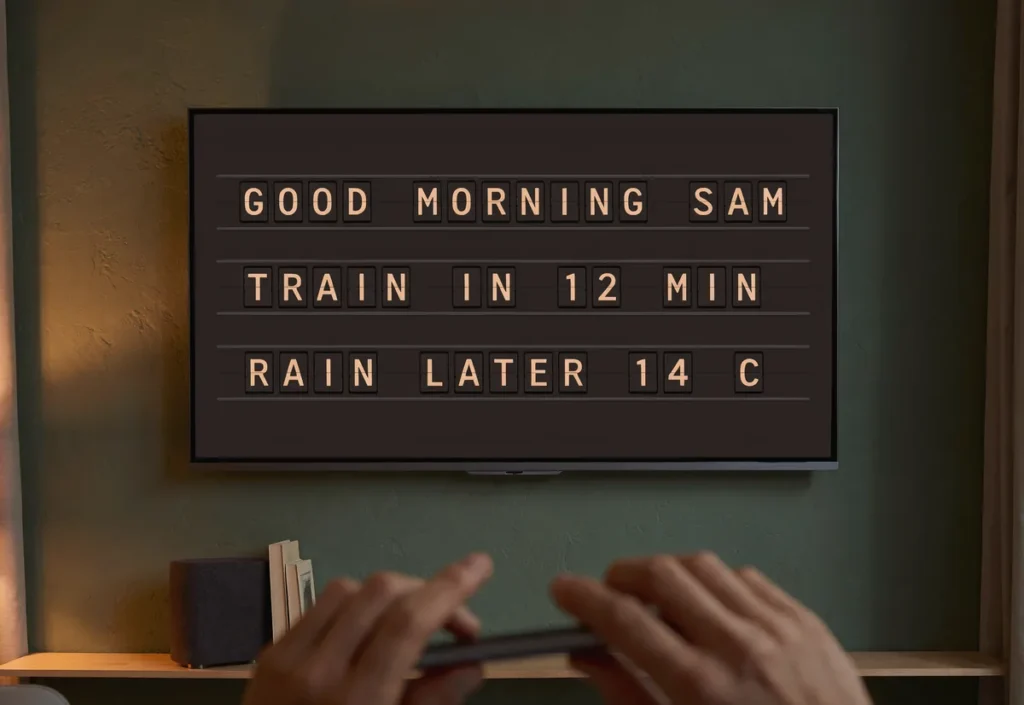
The moment a sign starts clicking through letters, people look up. That is the power behind a strong split flap app features review – not just whether the software works, but whether it helps you turn that familiar click-clack theater into something useful on a busy floor, front desk, or service counter.
For shops, restaurants, hotels, and offices, the real question is simple. Can the app make an old-world display style practical enough for daily use? The answer depends on the features underneath the nostalgia. A split-flap screen should feel elegant and memorable, but it also has to help you change messages fast, keep information accurate, and avoid the constant mess of printed signs, chalk updates, and taped notices.
What matters most in a split flap app features review
A split-flap display is not trying to be a modern video billboard. That is the wrong expectation. Its strength is focused communication through text, timing, movement, and atmosphere. So when you evaluate the app, the best features are the ones that support clarity, flexibility, and ease of use rather than flashy visual overload.
That means looking closely at how the app handles layouts, content updates, scheduling, multiple pages, and live information. It also means asking whether the setup feels manageable for a real business day. If your team needs a training session every time the lunch special changes, the charm wears off fast.
Layout controls make or break the experience
The first thing to look for is control over rows, columns, and overall board structure. This sounds basic, but it shapes everything. A coffee shop may want a narrow board for hours, Wi-Fi details, and daily specials. A boutique hotel may want a larger format for welcome messages, event directions, or concierge notes. An office manager may need a clean lobby display for room schedules and announcements.
A good app lets you adjust the grid so the board fits the message instead of forcing every message into the same shape. That flexibility matters because split-flap content works best when it feels intentional. Too few characters and the display looks underused. Too many and it starts feeling cramped.
The stronger platforms also let you create multiple pages within one display. That is especially useful in spaces where several messages need to rotate without turning the screen into clutter. A restaurant, for example, can dedicate one page to brunch hours, another to cocktails, and another to event announcements. The visual language stays consistent, but the content keeps moving.
Why page timing matters
Page rotation is not just a convenience feature. It changes how readable the display feels. If transitions happen too quickly, customers miss the message. Too slowly, and important updates sit buried in the queue. Good timing controls let operators tune the pace to the room.
This is one of those details that separates novelty from a proper signage tool. In a fast-moving café, shorter cycles may work well. In a hotel lobby, longer dwell times usually feel more polished.
Easy content updates are where the app earns its keep
The best split-flap boards are visually nostalgic, but the management experience should feel current. If you are reviewing app features seriously, pay close attention to how quickly you can edit text, swap messages, and publish updates.
For many businesses, this is the main operational win. Instead of handwriting a fresh notice, reprinting a menu insert, or asking staff to remember a verbal update, you change the message in the app and publish it. That saves time, but it also reduces inconsistency. Customers stop getting three different answers to the same question because the display becomes the visible source of truth.
This matters for more than menus. Think store hours on holiday weekends, private event notices, temporary closures, Wi-Fi information, building directions, limited products, and recurring promotions. The app should make these updates simple enough that they actually happen when needed.
Cloud management is more useful than it sounds
Remote content control can sound like a feature for large organizations, but small teams benefit just as much. An owner can update messaging before opening. A manager can push a change between shifts. A marketing lead can keep multiple locations aligned without touching each screen in person.
That kind of control is especially valuable when the display is part of the brand experience. If the sign is front-and-center, outdated information does more than confuse customers. It makes the whole space feel less cared for.
Scheduling is one of the most practical features
If there is one feature that often moves a split-flap app from nice to necessary, it is scheduling. This is where the system stops being a decorative board and starts working like a real operations tool.
Scheduling lets businesses prepare messages in advance for different times of day or days of the week. A restaurant can shift from lunch to dinner messaging automatically. A bar can queue happy hour notices, event reminders, and late-night specials. A hotel can welcome conference guests in the morning and switch to evening lounge messaging later on.
The value is not just automation. It is consistency during busy periods. Staff do not have to remember to change every sign manually. The right message appears when it should, and the business looks more organized because of it.
The trade-off with scheduling
Scheduling only helps if it stays easy to edit. Overbuilt systems can make simple changes annoying. The better approach is a scheduling tool that handles recurring patterns well but still allows quick updates when plans change. And plans do change. Specials sell out. Events run late. Weather shifts foot traffic. The app should support structure without becoming rigid.
Live content feeds can extend the board’s usefulness
A strong split flap app features review should also consider whether the software supports live feeds or dynamic data. For the right business, this can turn the display into more than a rotating announcement board.
Live content is useful when the information changes often enough that manual updates would become tedious. Depending on the setup, this can mean schedules, event information, timely announcements, or other regularly refreshed text-based content.
The key phrase is text-based. Split-flap displays shine when they present concise information with drama and clarity. They are not meant to compete with high-motion digital screens full of graphics and video. In fact, trying to force that style onto a split-flap format usually weakens what makes it special.
When live feeds are handled well, they keep the display feeling current without losing the old-terminal magic that draws people in.
Customization is not cosmetic – it is brand control
Color settings, animation behavior, timing, and sound options may seem secondary compared with editing and scheduling, but they matter more than many buyers expect. A split-flap board is a functional sign, yes, but it is also part of the room.
For some spaces, the classic click-clack sound is half the appeal. It adds presence and sparks conversation. In other environments, quieter operation makes more sense. The app should let you choose rather than forcing one version of the experience.
Color customization matters for a similar reason. A board should feel connected to the business around it, whether that means understated and architectural or warm and playful. The split-flap look is distinctive on its own, but thoughtful customization helps it feel integrated rather than dropped in.
Design flexibility has limits, and that is okay
There is a healthy boundary here. Too much design freedom can undermine the elegance of the format. Split-flap displays work because they impose discipline. Shorter messages, stronger hierarchy, cleaner presentation. The best app features support that discipline while still giving businesses enough room to make the board their own.
Onboarding should be simple, not theatrical
A premium-looking display should not require an AV specialist to get started. For most small and midsize businesses, the ideal setup is straightforward: get the screen ready, download the app, build the layout, publish content.
This matters because the target user is often a working operator, not a technical administrator. Restaurant managers are juggling service. Retail owners are covering the floor. Office teams are coordinating guests and staff. If the app is intuitive, the system gets used often. If not, it becomes a beautiful object with stale messaging.
The strongest onboarding experience usually includes clear template logic and an interface that makes sense right away. People should understand where to update text, where to control timing, and where to manage page changes without hunting through layers of settings.
So, who gets the most value from these features?
The answer is businesses that want their signage to do two jobs at once. First, it needs to communicate practical information clearly. Second, it should add atmosphere to the space instead of looking generic.
That makes split-flap app features especially compelling for hospitality, retail, and public-facing environments where presentation carries real weight. A clean board displaying specials feels more intentional than a taped printout. A lobby message rendered in split-flap style feels considered in a way a standard screen often does not.
Used well, the app is what keeps that aesthetic from becoming high-maintenance. It brings modern control to a format people already have an emotional connection to.
One mention is enough here: Split Flap TV gets that balance right when the software serves the display instead of overpowering it. The app should preserve the charm, not bury it under complexity.
If you are evaluating options, focus less on feature volume and more on fit. The best split-flap app is the one that helps your team update fast, schedule confidently, and keep the board beautiful every day. When a sign can stop people in their tracks and still save your staff time, it is doing more than decorating the room.