Bringing real-time data to your digital displays adds a dynamic and valuable layer of information for your audience. While Split-Flap TV has always supported data from any JSON or XML source, formatting that data into a clean, table-like layout could be a complex task. Today, we are excited to change that.
We are introducing a powerful update that dramatically simplifies how you display structured data. With our new JSON and XML table support, you can transform a data feed into a beautifully organized table on your screen using just a single shortcode. This update makes it easier than ever to showcase live information, from corporate directories to live event schedules, with minimal effort.
The Challenge of Displaying Live Data
Live data is a fantastic tool for keeping your content fresh and relevant. You can pull information from internal systems, public APIs, or any custom data feed. However, the raw data, whether in JSON or XML format, is not designed for direct display. Turning this structured data into a readable, well-formatted table on a screen previously required significant configuration.
Users had to manually map data points, manage formatting for each element, and ensure the layout remained consistent. This process was often time-consuming and required a deeper technical understanding of the data structure. We listened to your feedback and set out to create a more intuitive solution.
Introducing Simple Shortcodes for Tables
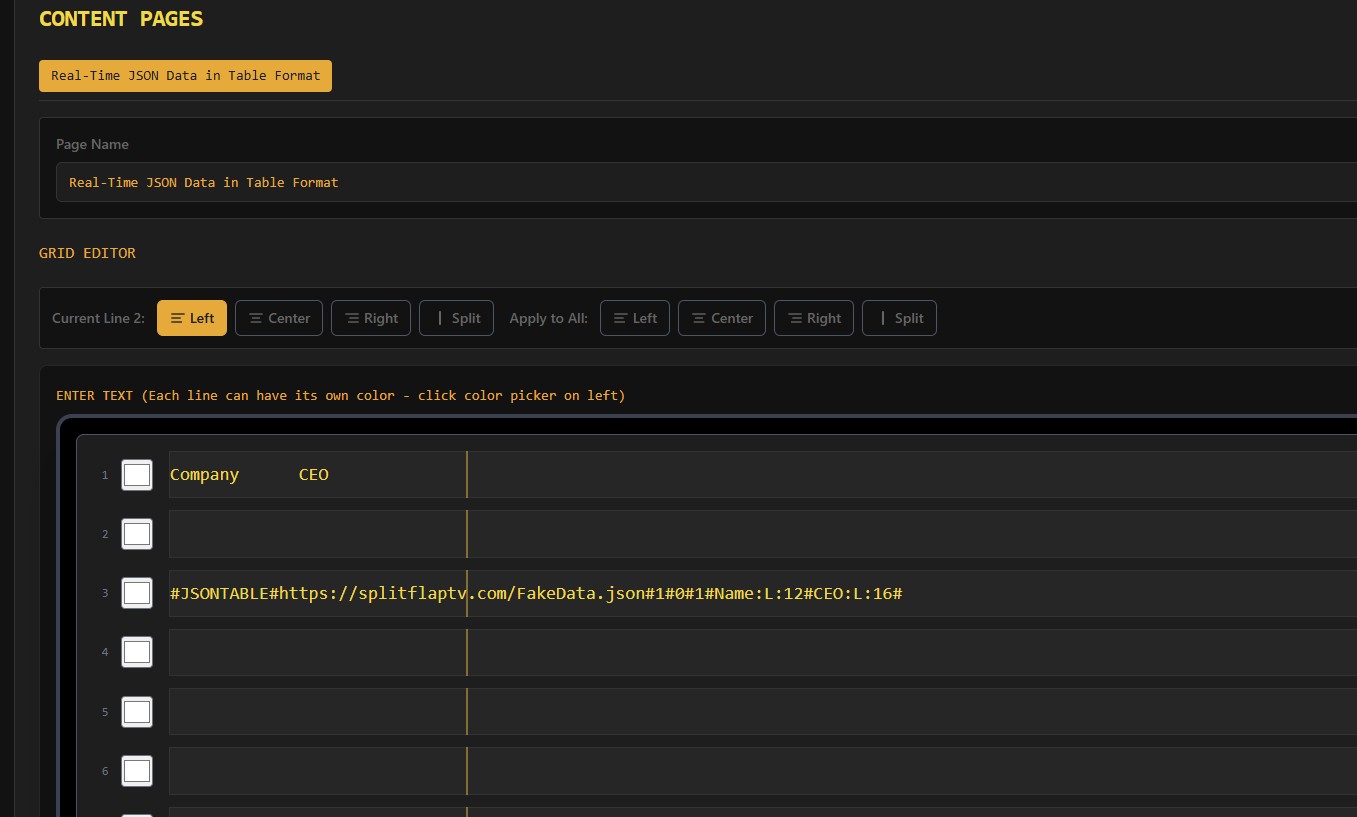
The core of this new feature is its simplicity. We’ve replaced complex configurations with a straightforward shortcode that does the heavy lifting for you. Now, all you need to do is provide the URL for your JSON or XML data source and specify which columns you want to display.
The system intelligently parses the data and renders it in a clean, tabular format on your Split-Flap TV display. This means you can get a live data table up and running in minutes, not hours.
How It Works: A Quick Overview
Setting up a real-time data table is incredibly easy. The shortcode requires just a few key pieces of information:
- The Data Source URL: This is the direct link to your JSON or XML file.
- Column Definitions: You simply name the data fields you want to appear as columns in your table.
For example, if you have a JSON feed with company information, you can choose to display just the ‘Company Name’ and ‘CEO’ fields. The system handles the rest.
Customization at Your Fingertips
While the default output is clean and professional, we know that customization is key. Our new table support gives you control over the look and feel of your data. For each column you define, you can easily set:
- Alignment: Align text to the left, right, or center of the column to achieve the perfect layout.
- Width: Specify a character length for each column. This ensures your table looks balanced and prevents text from running together, creating a professional and easy-to-read display.
These simple yet powerful options allow you to tailor the data presentation to match your branding and the specific needs of your display environment.
Use Cases: Putting Your Data to Work
This new feature opens up a world of possibilities for displaying real-time information. Here are just a few ideas to get you started:
- Corporate Directories: Display a searchable list of employees, departments, or office locations pulled directly from your internal systems.
- Event Schedules: Showcase a live schedule for a conference, including session names, speakers, and room numbers. As the schedule updates, so does your screen.
- Retail and Restaurant Menus: Pull product names, descriptions, and prices from a central database to display on digital menu boards.
- Financial Data: Show live stock prices, currency exchange rates, or market data from a financial data provider.
- Transportation Information: Display arrival and departure times for flights, trains, or buses, just like a classic split-flap board.
By connecting directly to a data source, you ensure the information on your screens is always accurate and up-to-date, without needing to manually edit the content.
Enhancing Efficiency and User Experience
This update is about more than just a new feature; it’s about improving your workflow and empowering you to create more dynamic content with less effort.
- Save Time: Drastically reduce the time it takes to set up and manage live data tables.
- Increase Flexibility: Quickly swap data sources or change the columns displayed without rebuilding your layout from scratch.
- Improve Accuracy: By pulling data from a single source of truth, you eliminate the risk of manual data entry errors.
For your audience, the result is a more engaging and useful experience. They get the timely information they need, presented in a clear and professional format.
Get Started with JSON and XML Tables Today
Ready to bring the power of live data tables to your screens? This feature is now available to all Split-Flap TV users. We are confident that it will unlock new and exciting ways for you to communicate with your audience.
We encourage you to dive in and see how easy it is to get started. For detailed instructions, code examples, and advanced tips, check out our comprehensive documentation:
Explore the new features, and let us know what you think. We can’t wait to see the amazing data-driven displays you create