
Digital Split Flap Display Software: The Ultimate Guide
February 15, 2026 · Captain
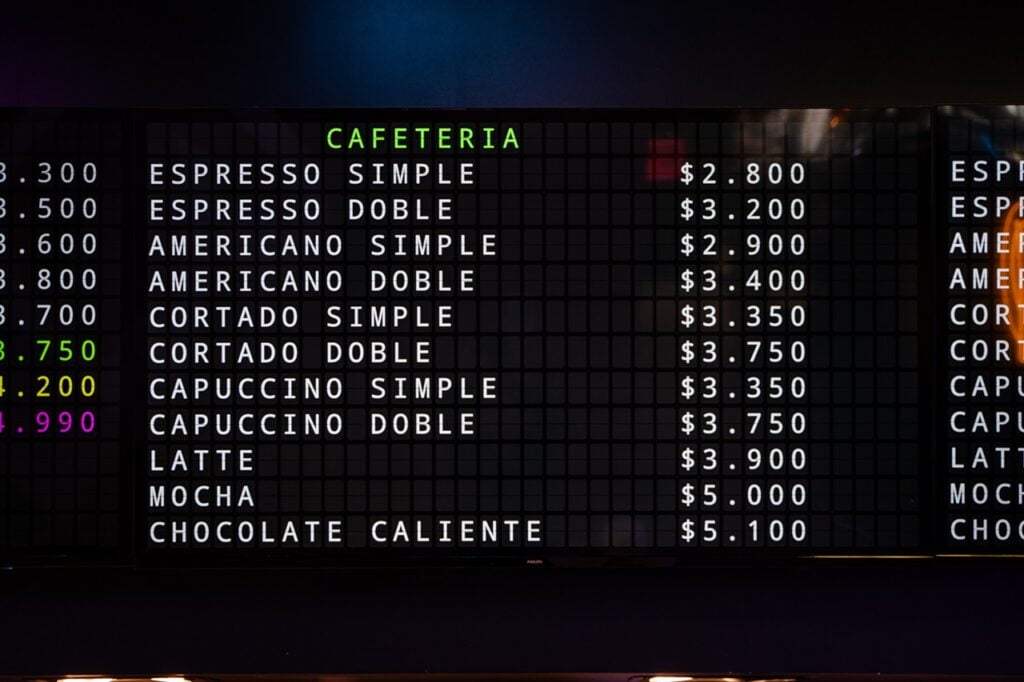
Love the look of a classic split-flap display but can’t justify the five-figure price tag? That iconic, clicking sound and retro charm often seem out of reach. You want the style, but you’re worried about the cost, the technical setup, and whether a digital version can truly feel authentic and look professional.
What if you could capture that same analog magic on a screen you already own? This is where the ingenuity of digital split flap display software comes in. It’s the elegant, modern solution that reimagines the classic airport board, transforming any TV or tablet into a stunning, dynamic message board without the mechanical headaches or hefty investment.
This ultimate guide is your ticket. We’ll break down everything you need to know-from essential features to the simple setup process-so you can confidently choose the right software for your business or home. It’s time to get that timeless aesthetic, affordably and easily. Let’s start flipping.
Key Takeaways
- Discover how digital split flap display software reimagines the classic airport board, letting you achieve the iconic retro look on any TV for a fraction of the cost.
- Identify the essential customization features that give you complete creative control over your display’s look, feel, and iconic clicking sound.
- Explore inspiring ways to use your display as a dynamic piece of art that captivates customers and brings your messages to life.
- Learn the simple, tech-free process to get your first custom display flipping in under 15 minutes.
What is Digital Split-Flap Software (and How is it Different?)
Remember the captivating charm of an old train station board, with its rhythmic clicking and flipping letters? That iconic aesthetic came from a complex, electromechanical Split-flap display, a piece of hardware costing tens of thousands of dollars. Today, you can capture that same nostalgic magic without the mechanical headaches or the hefty price tag. It’s all about the software.
Modern digital split flap display software is an elegant app that reimagines this classic for any TV or screen you already own. It’s a clever solution designed to instantly bring a dynamic, retro vibe to your space, achieving that million-dollar look for a tiny fraction of the cost. It’s not about buying new hardware; it’s about transforming your existing screens into something truly special.
Software vs. Physical Hardware: The Real Story
Why choose a digital app over a classic mechanical board? The advantages are clear, combining vintage style with modern convenience.
- Cost: A low-cost monthly subscription versus thousands (or even tens of thousands) for a single physical unit.
- Flexibility: Effortlessly change the size of your display by simply using a different TV. Move it from the wall to an event stand in minutes.
- Installation: Download an app in seconds. A physical board requires complex wall mounting, wiring, and professional installation.
- Maintenance: Receive automatic software updates with new features. Avoid the costly and time-consuming mechanical repairs that physical boards inevitably need.
How it Works: The Magic Behind the Screen
Getting started is remarkably simple. The system relies on three key components: a screen you provide (like any modern TV), a small media player, and the Split Flap TV app. Your content is managed from a simple, web-based dashboard on your computer or phone. Need to update a price or change a welcome message? Just type it in and your changes are sent over the internet to your display instantly. The software handles all the heavy lifting-the beautiful animations, the iconic clicking sounds, and even scheduling messages for different times of the day.
Who is This For? Top Use Cases for a Digital Display
The blend of retro cool and modern simplicity makes this a perfect fit for any business looking to stand out. Here are a few top use cases:
- Restaurants & Cafes: Display daily specials, menu items, or a warm welcome message that grabs attention.
- Offices: Share company announcements, celebrate team wins, or display meeting room schedules with style.
- Hotels: Greet guests by name, promote on-site events, and provide helpful information in the lobby.
- Retail Stores: Announce flash sales, highlight new arrivals, or post your store hours with an unforgettable flair.
Essential Features to Look for in a Split-Flap App
When you’re ready to bring the classic charm of a split-flap board to your screen, choosing the right digital split flap display software is the most critical step. Not all apps are created equal. The best ones offer a deep level of control, transforming your TV from a simple screen into a dynamic, engaging, and utterly cool messaging tool. The goal is complete command over your display’s look, feel, and content-without needing a degree in computer science.
Design and Layout Customization
Your display should reflect your unique brand or style. Look for software that puts you in the driver’s seat of design. True flexibility means you can move beyond basic templates and create something genuinely yours. Key features include:
- Full Grid Control: Adjust the number of rows and columns to perfectly fit any screen, from a wide-screen TV to a vertical tablet.
- Visual Styling: Customize fonts, character colors, and background images to match your brand’s aesthetic or the mood of your space.
- Mixed Content: The ability to seamlessly mix text, numbers, and custom symbols for things like social media icons or currency.
Effortless Content Management & Scheduling
The magic of a digital display is its ability to change in an instant. The best software makes this process simple and intuitive. A clunky interface is a dealbreaker. You need a powerful, web-based dashboard that lets you manage your content from anywhere, on any device. Look for the ability to schedule messages for specific times, create rotating playlists, and even manage multiple screens from a single account. It’s all about convenience and power.
Hardware Compatibility (The ‘Bring Your Own Screen’ Model)
Why invest in expensive, proprietary hardware when you don’t have to? Premier digital split flap display software embraces a “Bring Your Own Screen” philosophy. It should be compatible with affordable, off-the-shelf devices you may already own, like an Amazon Fire TV Stick, Apple TV, or any Android TV box. This approach ensures you can turn any modern TV or tablet with an HDMI port into a stunning retro display without breaking the bank.
Authenticity: The Iconic Sound and Animation
A silent split-flap is a soulless one. The most important feature is authenticity-capturing the nostalgic soul of the original analog boards. This comes down to two things: the sound and the motion. The software must deliver a high-quality, realistic “clacking” sound with adjustable volume. Equally important is the animation. The fluid motion of the characters flipping into place is a classic example of Kinetic typography, a design principle that breathes life into text. This is what separates a gimmick from a truly elegant and captivating display.
Creative & Inspiring Ways to Use Your Digital Display
A split-flap display is more than just a sign; it’s a dynamic centerpiece. With that satisfying, classic clicking sound, it commands attention in a way static signs simply can’t. The best digital split flap display software transforms any TV into a captivating experience, blending retro charm with modern convenience. It’s an elegant solution for creating moments that are both memorable and functional, whether at work, in your store, or in your living room.
For Your Business: Engage Customers and Drive Sales
Ready to make an unforgettable first impression? A digital split-flap display offers endless flexibility to communicate with customers and create a unique atmosphere. Stop blending in and start standing out.
- Restaurant Menu Boards: Announce the soup of the day or a happy hour special. Update prices and items instantly without ever touching a piece of chalk.
- Hotel Lobbies: Create a VIP experience by welcoming guests by name as they arrive, or display flight departure times with classic airport flair.
- Retail Windows: Announce a flash sale with an eye-catching, flipping message that stops passersby in their tracks.
- Office Receptions: Showcase your company’s core values, celebrate a big team win, or simply offer a warm, stylish welcome to visitors.
For Your Office: Improve Culture and Communication
Boost morale and keep everyone in the loop. A shared display can become the vibrant heart of your office, connecting your team and celebrating shared goals with a touch of retro-cool.
- Display key business metrics (KPIs) in real-time to track progress.
- Announce birthdays, work anniversaries, and company-wide news.
- Showcase a live feed of positive social media mentions.
- Make new hires feel special with a personalized welcome message on their first day.
For Your Home: A Functional Piece of Art
Why settle for a boring screen? Our digital split flap display software turns your home TV into a piece of functional art that’s both useful and beautiful. It’s the perfect conversation starter.
- Family Message Board: Leave reminders, assign chores, or just say “I love you” with a flip.
- Information Hub: Display your daily calendar, the local weather forecast, or stock market updates.
- Inspiration Wall: Showcase your favorite inspiring quotes or the lyrics to a song you love.
- The Ultimate Retro Clock: Turn your screen into a stunning, oversized split-flap clock for your living room or home office.
Ready to bring your own ideas to life? Start flipping today and see how easy it is to create something amazing.
Getting Started: Your 3-Step Path to a Retro Display
You might think that setting up a dynamic, retro-cool display requires technical skills or complicated hardware. Think again. The beauty of modern digital split flap display software is its elegant simplicity. You can go from a blank screen to a fully functional, clicking, and flipping display in under 15 minutes. It all starts with a screen you probably already own.
Step 1: Choose Your Screen and Player
Forget expensive, commercial-grade hardware. Grab any TV or monitor you have, connect an affordable media player like an Amazon Fire Stick, and you’re halfway there. For a more compact and personal touch, an iPad or Android tablet works beautifully. Position your screen in landscape for a classic departure board feel or portrait for a unique, modern twist.
Step 2: Download the Split-Flap TV App
The next step is to bring your screen into the ecosystem. Simply search for the Split-Flap TV app on your device’s store. It’s available on:
- Amazon Appstore
- Apple App Store
- Google Play Store
The download and installation take just a moment. Follow the simple on-screen instructions to pair the screen with your online account, instantly connecting it to our powerful and intuitive digital split flap display software.
Step 3: Design Your Board and ‘Start Flipping’
This is where the magic happens. Log in to your Split Flap TV account from any computer or smartphone to access the design studio. Here, you can create your first board, customize colors to match your brand’s aesthetic, and type out your message. Hit ‘Publish,’ and watch your message appear on your screen in real-time, complete with that iconic clicking sound. Experiment with scheduling content for different times of day or creating multiple boards for any occasion.
Ready to bring that classic charm to your space? The process is fast, the result is stunning, and your audience will love it. Bring your screen to life today.
Start Your Free Trial and see how easy it is.
Reimagine Your Display: The Future of Retro is Here
The journey from classic airport lounges to your modern screen is now complete. We’ve explored how digital split flap display software bridges the gap between beloved nostalgia and powerful convenience. You now know the essential features to look for-from custom messaging to that iconic clicking sound-and have seen the inspiring ways it can transform any space. The key takeaway is simple: you no longer need expensive, bulky hardware to capture that timeless, retro cool charm.
Trusted by innovative cafes, offices, and hotels worldwide, Split Flap TV offers a smart, affordable solution for captivating digital displays. Are you ready to stop your customers in their tracks? It’s time to bring your messages to life with the mesmerizing flip of a classic display.
Start Flipping: Try Split Flap TV Free for 7 Days
Reimagine the classic display board, today. Your audience is waiting.
Frequently Asked Questions
What’s the difference between digital split-flap software and a mechanical board?
Think of it as classic charm meets modern convenience. Mechanical boards are a beautiful, physical piece of hardware with a premium price tag. Our digital split-flap display software, on the other hand, delivers that same nostalgic aesthetic on any screen you already own. It offers incredible flexibility and affordability, transforming a standard TV into a dynamic retro display without the significant hardware investment. It’s the smart, scalable way to get the look you love.
Can I really use any TV for a digital split-flap display?
Absolutely. That’s the beauty of our elegant solution. Any modern television or monitor with an HDMI input will work perfectly. You simply connect a small, inexpensive media player like an Amazon Fire TV Stick, Chromecast with Google TV, or a mini-PC to your screen. Install our app, and you’re ready to start flipping. It turns your existing hardware into something truly special, saving you time and money.
How much does split-flap software typically cost?
Getting this iconic look is far more accessible than you think. Instead of the thousands of dollars required for a physical board, our software operates on a simple and affordable monthly subscription model, priced per screen. This makes it a cost-effective solution for everyone from a local coffee shop to a multi-location enterprise. You get all the retro-cool style and engagement without the hefty upfront cost, allowing you to allocate your budget where it matters most.
Does the software include the authentic ‘clicking’ and ‘flapping’ sounds?
Of course! The sound is the soul of the split-flap experience, and we’ve obsessed over getting it right. Our software includes high-fidelity audio recordings of the classic mechanical clicks and flaps, perfectly synchronized with the digital characters as they flip into place. This essential sensory detail is what conjures the powerful nostalgia of a bustling train station and brings your display to life, creating an atmosphere that is truly unforgettable.
Is it difficult to set up and manage the content on the display?
Not at all. We designed our system to be incredibly intuitive and user-friendly. Setup takes just a few minutes: plug in your media player, install the app, and pair it with your account. From there, you can manage all your content from a simple web-based dashboard on your phone or computer. Updating a menu, posting a welcome message, or scheduling content takes only seconds. It’s powerfully simple technology.
Can I control multiple screens in different locations from one account?
Yes, our platform is built for scale. From a single, centralized dashboard, you can easily manage an entire network of displays. Whether you have two screens in one office or a hundred screens in locations across the country, you have complete control. You can push content to all screens simultaneously or target specific messages to individual displays. It’s a powerful tool for ensuring brand consistency and timely communication everywhere.